Bambu Lab H3C: What Does a Nine-Tool FDM Printer Offer Small Manufacturers?
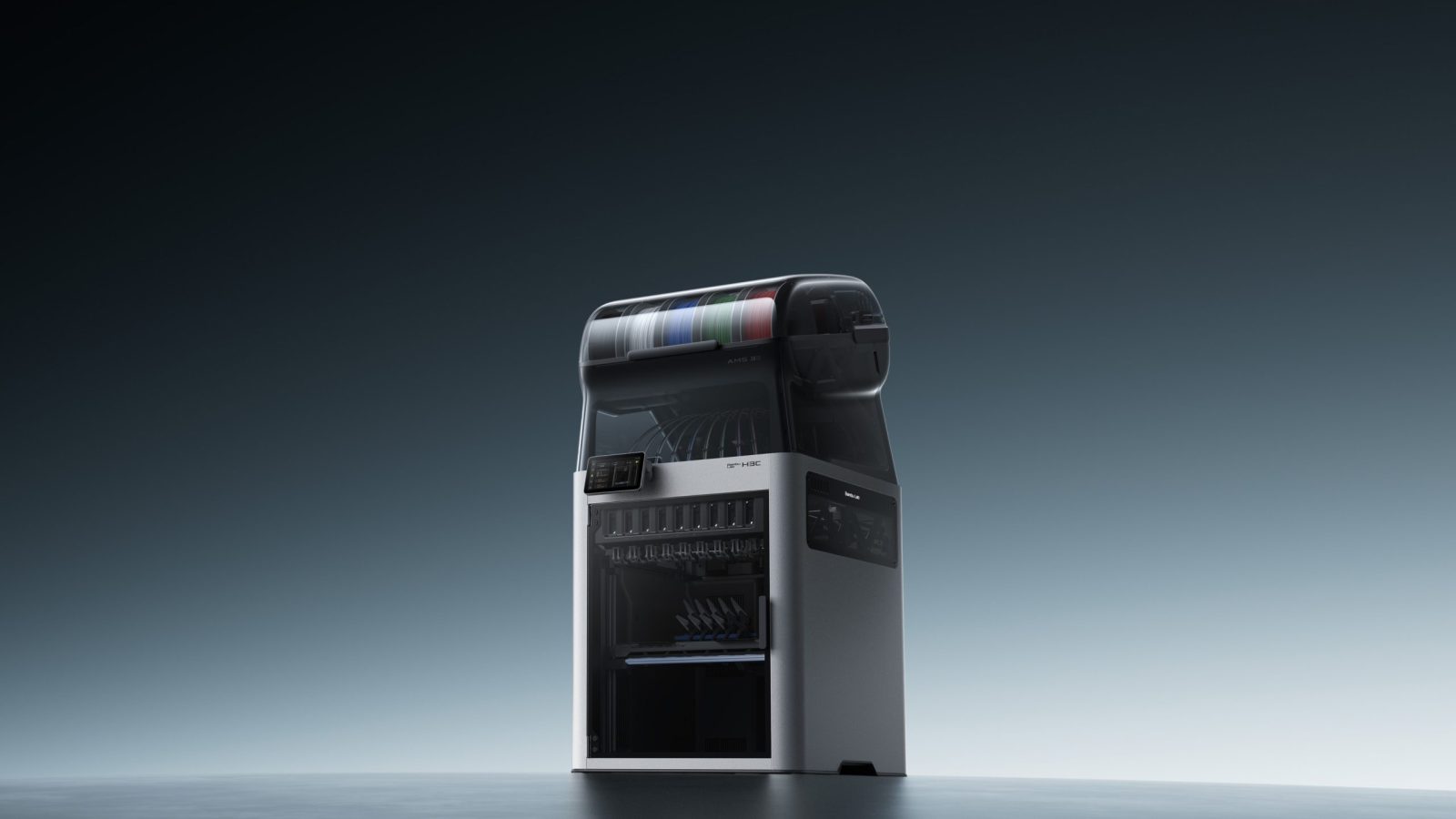
Bambu Lab H3C aims to speed up tool changes in multicolor and multi-material FDM printing with its Swaptek system, which keeps nine separate print tools ready in the same machine. For FDM users in Turkey, the real significance of this news lies less in the number of tools and more in how color and material changes affect production time, waste, and design decisions. The announced specifications come from the manufacturer; they are not the same as independent, long-term usage results.
How does the H3C’s nine-tool system work?
In traditional single-nozzle multicolor systems, the printer retracts one material, loads another, and prepares the flow for the new color. In the H3C, each tool has its own filament path and heater. According to Bambu Lab, the system starts heating the next tool while the current print is in progress; by the time the mechanical change takes place, the new tool is close to its target temperature or ready. The aim is to reduce lengthy loading and unloading steps at each change.
The company also says it includes a retractable rack that prevents the nine tools from colliding with the guide tubes during printing, as well as automatic tool-offset calibration. This kind of automation could make it easier to prepare a multicolor part, but the system’s mechanical complexity, maintenance needs, and long-term reliability should also be considered when making a purchase decision.
How do the specifications affect production decisions?
According to product information published by the manufacturer and news source, the H3C features a fully enclosed body, a 330 × 320 × 325 mm build volume, a maximum tool temperature of 350 °C, and active chamber heating up to 65 °C. Alongside the nine-tool changer, the AMS 3H filament system is also a key part of the announcement. These specifications support the machine’s aim of using different filaments in the same job, but they do not mean that every material will print reliably under these conditions or that every part will have the strength required for its intended use.
| Feature | Announced specification | What it means for users |
|---|---|---|
| Tool changer | 9 independent tools | Allows color or material changes to be managed within the same job |
| Build volume | 330 × 320 × 325 mm | Check the dimensions and placement of a single part before slicing |
| Maximum tool temperature | 350 °C | Claimed to expand compatible filament options; the material profile still matters |
| Active chamber heating | Up to 65 °C | An enclosed, temperature-controlled environment designed for materials that require heated printing |
| AMS 3H drying | Up to 85 °C, according to the manufacturer | Could simplify filament management; the correct drying time depends on the material |
In addition to its 1.75 mm filament path, the H3C supports 2.85 mm filament through a specific bypass path and has a separate feeding approach for flexible TPU. Bambu Lab claims higher flow rates and printing with soft TPU down to a 75A hardness rating. These are manufacturer claims; filament formulation, moisture, model geometry, and slicer settings can all affect the results. The hardened steel nozzle is also intended to support work with abrasive materials such as carbon- or glass-fiber-reinforced filaments; material compatibility and maintenance instructions should still be checked.
Where is the real benefit for FDM users in Turkey?
Shorter tool changes on a multicolor model could reduce the total time for long prints and make it more practical to design different hardness zones in a single part. On the other hand, users who do not need all nine tools may leave some of the system’s added capacity unused. The announced price of the machine is 2.499 US dollars; taxes, customs duties, shipping, and local service conditions can change the total cost of ownership. So it is worth considering not just the purchase price, but also consumables, spare-part availability, maintenance, and the time saved per job.
For a small manufacturer, the key question is not “How many colors can it print?” but “How many hours or manual steps will this feature save in my regular workflow?” A workshop with a wide range of products may benefit from the multi-tool setup if it frequently makes color variants of the same part or combines flexible and rigid sections. For someone producing single-color prototypes and simple fixtures, a more straightforward FDM printer may be a better fit. In multi-material designs, interface adhesion, differences in shrinkage, and how the part performs under real loads should also be validated.
- Do your jobs involve frequent color or material changes, or is this a rare need?
- Will the time saved by faster tool changes justify the system’s additional cost?
- Can you access filament, nozzles, and service support where you live?
- Can a prototype print be used to test the finished part’s dimensional, flexibility, and strength requirements?
Validate the part and workflow before buying
The H3C is a noteworthy announcement that aims to make multi-tool use more integrated in the desktop FDM category. But claims of high speed and automation do not mean lower costs or better parts for every job. Start by selecting a representative part from your own models, then compare setup, printing, and post-processing for single-material and multi-tool production. For an enclosure, fixture, or prototype made with FDM, you can get a pre-print file check and suitability assessment as part of the 3D printing service. If your model file is ready, check the estimated cost with the 3D printing price calculator; for projects such as electronics enclosures, also consider FDM part production for electronics and IoT. When planning to use different filaments in the same model, the multicolor 3D printing guide can help clarify the key decisions.




 Türkçe
 العربية
 Русский
 فارسی
 Deutsch